TP-Link WiFi Gold Coast
Professional TP-Link WiFi installation and configuration for Gold Coast homes. Whether you need a Deco mesh system, an Omada EAP access point or a new router — we supply, install and set it up correctly.
Confirmation email sent immediately after booking. Or request a callback instead →
TP-Link WiFi Gold Coast — Quick Summary
- TP-Link Deco mesh, Omada EAP access point and Archer router supply and installation
- Professional placement and configuration — not just plugged in and left
- Omada controller setup for homes and small offices needing central management
- Full network configuration — SSIDs, passwords, guest networks
- Suitable for homes, home offices, rental properties and Airbnb
- Handover walkthrough — Deco or Omada app configured on your devices
- ABN 92 636 893 108
Popular TP-Link Products for Gold Coast Homes and Small Offices
These are the TP-Link models we most commonly supply and install for Gold Coast homes and small offices. We cover the Deco mesh, Omada EAP and Archer router ranges.
Wi-Fi 6E · Tri-band mesh
Deco XE75
Mid-rangeWhole-home mesh for Gold Coast homes where ethernet cabling isn't practical.
Wi-Fi 6 · Ceiling AP · 4×4
Omada EAP670
Mid-rangeBusiness-grade ceiling access point — the best TP-Link option when ethernet can be run.
Wi-Fi 6 · Wall-plate AP
Omada EAP615-Wall
Mid-rangeMounts over an ethernet wall plate — ideal for homes with existing structured cabling.
Wi-Fi 7 · Tri-band · 10G
Archer BE800
PremiumTP-Link's flagship router for fast NBN connections and maximum throughput.
Wi-Fi 6 · Compact mesh
Deco XD4 (3-pack)
BudgetAffordable whole-home mesh for apartments and smaller Gold Coast homes.
Prices vary by model and installation complexity. Call 07 3041 8993 for a quote.
What We Do — TP-Link WiFi Gold Coast
From Deco mesh installs to Omada EAP ceiling access points, here is what we cover.
Site Assessment & Product Recommendation
We assess your floor plan and advise whether a Deco mesh, Omada EAP or Archer router is the right fit. Gold Coast homes in Robina, Coomera and Helensvale often need more than one node.
Supply & Installation
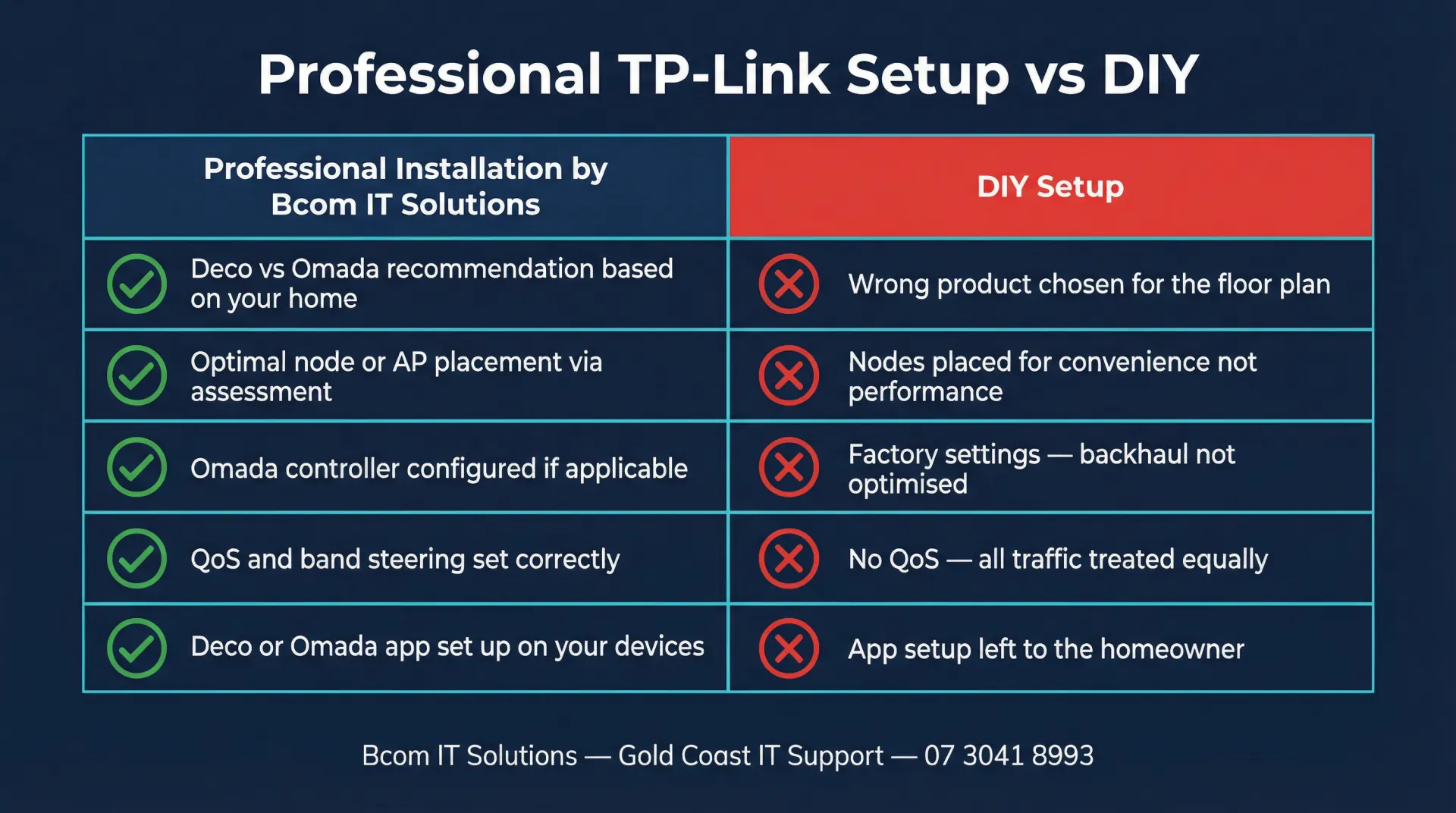
We supply genuine TP-Link hardware and install it correctly — Deco nodes placed for backhaul performance, Omada EAPs ceiling-mounted and PoE-powered. Not just plugged in and left.
Network Configuration
SSIDs, passwords, band steering, QoS and guest networks configured to your requirements. Omada controller setup included for homes and small offices needing central management.
Security Configuration
WPA3 encryption, isolated guest networks and automatic firmware update scheduling. We harden your TP-Link network properly so it doesn't become a liability.
App Handover & Training
We install the Deco or Omada app on your phone and walk you through the dashboard. You leave knowing how to manage your network, check connected devices and run a speed test.
Ongoing Support & Expansion
Already have a TP-Link setup that needs expanding or troubleshooting? We support existing Deco and Omada networks and can add nodes, access points or upgrade your hardware.
How a TP-Link WiFi Installation Works
Phone or Video Consultation
Tell us about your home — floor plan, number of levels, current router location and problem areas. We advise on Deco vs Omada and provide a quote on the call.
Hardware Procurement
We source your TP-Link hardware and schedule the installation visit. We carry common Deco and Omada models on our vans for fast-turnaround installs when stock allows.
Installation & Configuration
On the day we place nodes or mount EAPs, connect cabling, configure the network and test coverage in every room. Most Gold Coast installs complete in 2–3 hours.
Handover & Support
We walk you through the Deco or Omada app, show you how to monitor your network and answer questions. Our number stays in your phone — call 07 3041 8993 if anything comes up.
TP-Link WiFi Installation on the Gold Coast — What to Expect
TP-Link WiFi Gold Coast installs are some of the most common jobs we do. The brand sits in a sweet spot — it offers genuinely capable hardware at a price point that suits most Gold Coast households, and the Deco and Omada ranges cover everything from a simple apartment setup to a multi-AP home office deployment. The challenge is that TP-Link hardware, like most consumer and prosumer WiFi, performs very differently depending on how it is placed and configured. A Deco node sitting on a shelf in a back bedroom is not the same as one positioned correctly for backhaul and coverage.
Gold Coast homes present specific WiFi challenges. Large single-level slabs in Robina and Varsity Lakes can have dead zones in back bedrooms and outdoor entertaining areas despite a strong signal at the front of the house. Double-brick construction in older Southport and Broadbeach units attenuates 5GHz signals significantly. Homes in Coomera and Helensvale on larger blocks often need a mesh node or a second access point to cover the garage or pool area. A phone assessment or site visit before installation means we place hardware where it will actually work, not where it is convenient to plug in.
The choice between Deco and Omada depends on the property and how the network will be used. Deco is a consumer mesh system — it is easy to manage via the Deco app and works well for homes where running ethernet cable to every access point is not practical. Omada is TP-Link's business-grade line — ceiling-mounted EAP access points connected via ethernet and managed through the Omada controller. Omada gives us more granular control over VLANs, guest networks and QoS, and it is the better choice for home offices and small businesses in Southport and Burleigh Heads that need reliable, manageable infrastructure. We will recommend the right system on the initial call once we understand your floor plan and requirements.
Rental property owners and Airbnb hosts on the Gold Coast get particular value from a properly configured TP-Link setup. A Deco mesh with a dedicated guest SSID keeps guest traffic isolated from the main network, and the Deco app makes it straightforward to change the guest password between bookings. For properties in Surfers Paradise and Broadbeach with multiple floors or large entertaining areas, a two or three-node Deco system installed and configured correctly eliminates the dead zones that generate negative reviews.
We are not a TP-Link reseller program participant and receive no referral fees. We recommend TP-Link when it genuinely suits the property and budget. We also install Ubiquiti UniFi, Grandstream, ASUS and other brands where they are a better fit. If you are not sure which system is right for your home, call us and we will advise honestly. For a broader overview of our WiFi installation services across the Gold Coast, see our WiFi setup Gold Coast page.
TP-Link WiFi Gold Coast — Frequently Asked Questions
TP-Link WiFi Installation Across the Gold Coast
We install TP-Link Deco, Omada and Archer hardware across all Gold Coast suburbs. Whether you are in a beachside apartment in Surfers Paradise, a family home in Robina or a new estate in Coomera, we can assess, supply and install your WiFi system. Bcom Services Pty Ltd — ABN 92 636 893 108 — is a locally owned Gold Coast IT business. Call 07 3041 8993 to discuss your requirements.
Book a TP-Link WiFi Installation on the Gold Coast
Fast response available. We supply, install and configure your TP-Link system and hand it over fully working.
Also see: business WiFi Gold Coast · WiFi setup Gold Coast · Ubiquiti UniFi Gold Coast · Network security Gold Coast
Last updated: March 2026